
✨ New and Improved
🔧 Adjustments and updates
August '26
✨ Custom Export - Early Access expanded
Custom Export keeps growing: you can now start an export directly from the Export tab in Settings, and manage your saved templates more easily — including deleting templates you no longer need. Build exactly the export you need: pick your data (Contracts, Invoices, Costs, Cost center allocations or Assignments), choose the fields, preview the result, and save it as a reusable template.
Custom Export is currently in Early Access. Interested in trying it out? Contact our team to get access.
🔧 Overview filters & columns
Finding the right data is now faster across the platform:
- Costs: filter by invoice or company, and see the cost center directly as a column
- Invoices: filter by a book-date range
- Cards: filter by card type
- Employees: new work-email column and cost center filter
- Assets: financing type and contract type are now separate, clearer filters
🔧 Employees
The employee detail page now includes a Consumption tab, so you can review an employee's energy consumption without leaving the page. Assignments can now also be created for inactive employees, and historical assignments are accepted through bulk import.
🔧 Imports
Accepting all changes on the import review screen now runs in the background, so large imports with thousands of changes complete reliably without errors.
🔧 Reporting
The Benefit in Kind Mutations report can now be generated for all legislation in one file, covering BE, NL, LU and DE — no more separate downloads per country.
🔧 Exports
The Arval export template now uses Arval's updated header structure, so exports keep matching the format Arval expects.
🔧 Bug fixes & user experience improvements
We've fixed several bugs, including more accurate search and export behaviour, for a smoother day-to-day experience.
July '26
✨ Automated Stakeholder Communication
Set up automated communication to internal stakeholders and suppliers from a dedicated dashboard: manage recipients and BCC, enable triggers per audience, preview the message a trigger will send, and follow everything in a communication log. Queued emails can be cancelled before they go out.
✨ Custom Export - Early Access
Compose exactly the export you need — across Contracts, Invoices, Costs and Cost center allocations — preview it, save it as a template and reuse it, instead of relying on fixed export templates. All exports are tracked in a new Export history tab under Imports & Exports.
✨ Streamlined onboarding
New customers are now guided through creating their account and setting up their environment — a smoother, faster path to getting started with Muto.
🔧 Vehicles & Finance
A Total Cost of Ownership (TCO) field is now available on personal vehicles and LCVs — on the vehicle detail page and in the standard imports and templates. Useful for your Mobility Policy and the Federal Mobility Budget. In addition, VAT corrections are now automatically reflected in cost figures, and invoice lines are validated on their date ranges up front.
🔧 Assets
Asset overviews can now be filtered by contract status, so you can quickly narrow the list to the contract states you care about.
🔧 Bug fixes & user experience improvements
We've fixed several bugs; including more accurate change detection on imports, universal search for licence plates containing hyphens, and keyboard navigation — and strengthened performance behind the scenes.
June '26
✨ Review imported data
When an import includes changes that might overwrite existing records, Data Review prompts you to confirm these updates before they are applied. This gives you greater control over your data and helps avoid unintended changes.
Learn more about it here: Review your data changes
🔧 "New interface"
We have refreshed our interface. Settings are now easier to access, and the former “Suppliers” section has been renamed to “Import & Export” so it is more visible and intuitive to use.
May '26
✨
🔧 "Smart Import"
Smart Import now cleans and normalises registration numbers during import and uses them to identify the matching asset, reducing manual correction on imported files.
🔧 "BIK Reports"
All BIK reports gain extra vehicle and fiscal fields, and now apply the "private use allowed" logic so the output reflects whether private use is permitted.
🔧 "Search results"
The "Replaces" search now shows the driver name in results, making it easier to pick the right record when replacing an assignment.
April '26
✨ "Single Sign-On (SSO)"
- When an admin invites someone to an organisation that uses SSO, the invitation flow now provides clearer sign-in instructions so new users can get started immediately. In addition, admins see a more transparent overview of the organisation’s SSO configuration in Settings, making it easier to verify that everything is set up correctly.

🔧 "Smart Import"
-
Smart Import now handles Excel files with multiple tabs and non-standard header rows. Users can pick the sheet and the header row before mapping columns.
- Added additional Euro Types 6e , 6e-bis and 6e-bis-FCM
-
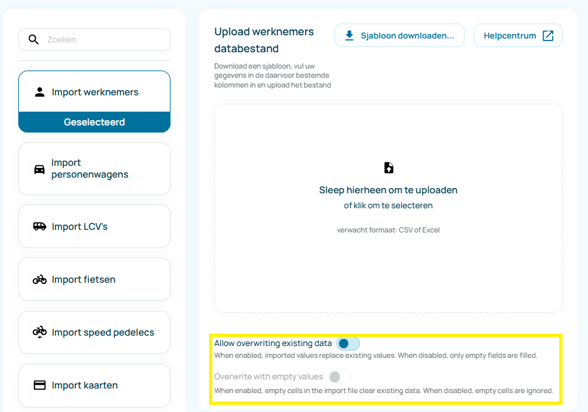
A new overwrite toggle allows users to actively replace existing records during import, rather than only appending or matching data:
🔧 "Exports"
-
Exports now include the assignment start date; useful for HR and finance reconciliation.
- You can now choose to include notes when exporting asset and employee data.
- A new supplier filter on the asset endpoints enables supplier-specific views and exports.
🔧 "Connections"
-
Added connection for KBC LU Vehicles and contracts
- Added connection for Europcar BE Shortlease vehicles and contracts
March '26
✨ "Reporting & Insights - Part 2"
Key insights are now surfaced directly in the pages you use every day, including the dashboard, asset overview and detail views, employee overview, and cost pages.
Full article here
🔧 "Enhancements"
-
“Date in service” can now be optional where appropriate, with aligned validation across backend and UI.
-
Cost center assignment history no longer inserts a default assignment between two valid assignments.
-
Performance improvements when updating related cost objects.
-
Universal search relevance improvements.
-
Better ordering options in the users list.
-
Consumption dashboards now hide filters that aren’t meaningful for those charts.
February '26
✨ "Reporting & Insights - Part 1"
Full article here
🔧 "Exports"
Costs overview export: costs can now be exported with more comprehensive detail for analysis and reporting.
Financial export: new export capability for financial data in accounting-friendly formats.
Employee export: now includes “ordered for” asset information (even if not assigned yet).
January '26
✨ "Exports & Assignments"
Asset and employee export files now also include current assignments, so you can see:
-
- The current assignment for employees
- The asset(s) currently assigned
🔧 "Task Management"
Dashboard: see unassigned tasks at a glance
The task overview on the dashboard now includes unassigned tasks, giving you visibility into all open work, not just tasks with an owner.
🔧 "Contracts & Cost Types"
We've added a new ELECPROV cost type for contract provisioning.
🔧 Bug fixes, Security optimisations, User experience improvements
We’ve fixed several bugs, improved performance for a smoother user experience, strengthened security, and prepared a range of exciting new features that will be revealed soon!
December '25
✨ "Import Failed Details"
If an import fails, you can now view its details. For completed imports, visit Settings → Connections → Import History and select any import to see more information.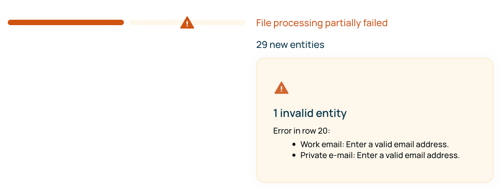
✨ "Task Preferences and automated tasks"
Take control of your renewal workflows by setting clear rules for when and how tasks are automatically created as contracts approach expiration. For a seamless onboarding experience, tasks are also generated automatically whenever new employees join or assets are delivered, helping you maintain consistent processes across your organization.
These enhancements lay the foundation for even more advanced automated workflows to come!
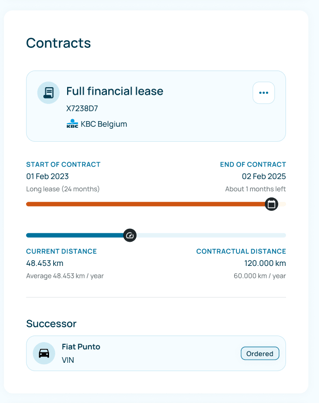
✨ "Contract Successor Visibility"
Now, you can access asset successor details directly within the detail sections on the asset page. Understanding and tracking successor information supports proactive continuity planning, helping your team manage asset transitions smoothly and avoid disruptions in your mobility operations.
November '25
✨ "Replacement" & "Ordered For"
We’ve added an option at the asset level, allowing you to assign the asset as “Replacement for ...” and “Ordered for ...”. These details will also be shown on the Activity tab.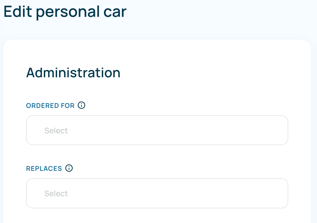
🔧 BIK Improvements and bug fixes
We’ve enhanced BIK reporting for greater speed, accuracy, and reliability - delivering a smoother experience while resolving key issues behind the scenes.
October '25
✨ Implemented Sorting
All tables now support updated sorting logic for a more intuitive experience.
Users can now sort list views by any available field for more flexible data handling.
✨ Archiving details
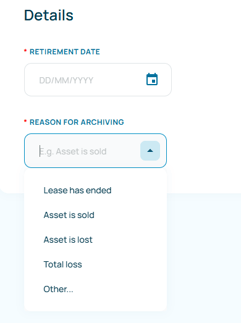
You can now record the reason and date when retiring an asset, making it easier to maintain complete and accurate lifecycle records.
✨ Renamed contract "details" to "remarks"
The "Details" field in contract records is now labelled "Remarks", providing a clearer space for relevant notes and context.
✨ Mark task as done when action is completed
Tasks are automatically marked as done when their related action is completed.
September '25
✨ Introducing Tasks
Stay on top of what matters! With Tasks, you can easily track and manage actions directly in Muto.
And this is just the beginning – we're working towards smart, automated task assignments with real-time notifications.
Discover how Tasks work in our Help Centre.
✨User settings
We’ve added a new settings page where you can easily update your profile details, like your name and preferred language. Plus, the profile menu has a fresh new look for a smoother experience!