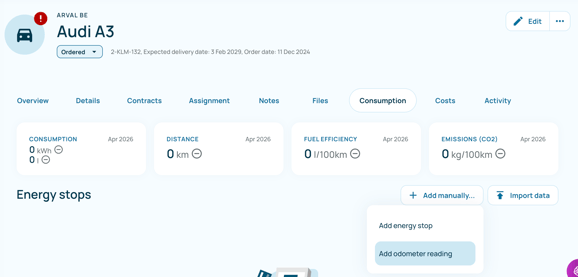
Steps to add an odometer reading
To add an odometer reading, navigate to the vehicle overview page, open the Consumption tab, click + Add manually…, select Add odometer reading, enter the date and current mileage, then save the entry.
- Navigate to the Vehicle
- Go to the vehicle overview page.
- Select the relevant vehicle (e.g., Alfa Romeo Giulia).
- Open the Consumption Tab
- Click on the Consumption tab in the top navigation bar
- Start Manual Entry
- Click the + Add manually… button on the right-hand side
- Select Odometer Reading
- From the dropdown menu, click Add odometer reading
- Enter the Required Information
- Date: Select the date of the reading.
- Odometer Value (km): Enter the current mileage of the vehicle.
- Save the entry
- Confirm and save the input